Overview
- What is dbt?
dbt is a tool for the T (Transform) part of ELT (Extract Load Transform). It’s good for querying already stored data and modifying it. Can be used to centralize all your data transformations.
(1) dbt uses data models → enables code reuse
(2) automated quality tests → good for production data (always ensures data consistency)
- dbt bootcamp lecture: link
- Top-down approach: learn theory first → practical stuff later
background
data warehouse vs data lake vs data lakehouse
(1) data warehouse
aggregates data -> into single data repository (any structured data; csv crm ..) => ETL
-> load into data warehouse
-(transform & curate)-> analytics reporting purpose
- purpose : optimize sql analytics
- use only structured data
- cost is high -> orginize all data before storing data in data warehouse fixed scheam
- scaling data is expensive and difficult
- ex) snowflake bigquery
(2) data lake
aggregate data => single repoistory (any structured unstructured semi-structured data)
-> DL -> ELT
-(transform & curate)-> AI ML usecases
- preformance of data is high (everyting is organized before storing)
- purpose : hybrid analytics
- cost low -> cuz it dumps data
- performance is close to data warehouse
- flexibile schema
- scaling data is low and easy
- ex) s3
(3) data lake house
combines flexibility and the scalabillity of data lake + data management capabillity of data warehouse.
(any structured unstructured semi-structured data)
-> DLH -> metadata layer (provides structured and schema data)
-> (ETL/ELT) -> Any prupose (analytics ML etc…)
- purpose : storing raw data
- anytype of data : semi unstructured strucutred
- storage for data cost is low
- preformance of data is low (becuase it is dumped)
- flexibile schema
- scaling data is low and easy
- ex) databricks
ETL vs ELT
(1) ETL
extract -> transform -> load
traditional model
ex) source -> facility -> pipe the water to target
means: extract raw data -> transform it (through joining cleaning) -> clean strucutred cloud data warehouse
- best for large volume and complex data
- usecase : processing data from cloud application when we’re working with financial systems and marketing tools
(2) ELT
Extract -> Load -> and then Transform
flips traditional ETL
ex) you pipe the raw water directly into the reservoir -> treat it inside the reservoir using built-in filtration systems
means: raw data from the source -> load directly into warehouse -> transform using the compute power of that cloud system
- With ELT data pipeline data cleansing enrichment and data transformation all occur inside the data warehouse itself
- cloud data warehouses such as Snowflake Amazon Redshift Google BigQuery and Microsoft Azure all have the digital infrastructure
- so if data volume spike or become unpredictable costs can quickly ballon.
- cloud data warehouses such as Snowflake Amazon Redshift Google BigQuery and Microsoft Azure all have the digital infrastructure
- usecase: modern CDW (take advantage of their scalable compute) analytics workloads
=> so it isn’t just about architecture it’s also about performace cost and compliance
💡 modern data stack is just the productionization of the different layers of data integration flow.
My Project (dbtlearn)
- what did I did pastly (review from claude-code)
What You Built

  This is a learning project using Airbnb data. You've built a complete data pipeline:

  Raw Data (Snowflake)
      ↓
  src/ (staging - ephemeral)
      ↓
  dim/ (dimensions - tables)
      ↓
  fct/ (facts - incremental)
      ↓
  mart/ (business layer)

  1. Layer: src/
  Models: src_listings src_hosts src_reviews

  2. Layer: dim/
  Models: dim_listings_cleansed dim_hosts_cleansed dim_listings_w_hosts

  3. Layer: fct/
  Models: fct_reviews

  4. Layer: mart/
  Models: mart_fullmoon_reviews


  What You've Implemented

  - Sources with freshness checks (warns after 1hr errors after 24hrs)
  - 18+ tests using dbt_expectations package (regex quantiles row counts)
  - Custom macros: positive_value no_nulls_in_columns logging examples
  - Snapshot: scd_raw_listings for tracking historical changes
  - Post-hooks: Auto-grants SELECT to REPORTER role
  - Incremental loading with date range variables

  What dbt run Does

  Yes it makes changes in Snowflake.

  It:
  1. Compiles your .sql model files into raw SQL
  2. Executes that SQL against Snowflake to create/replace tables and views
  3. Creates objects in your AIRBNB.DEV schema (based on your profiles.yml)

  For example:
  - dim_listings_cleansed → Creates a TABLE in Snowflake
  - dim_listings_w_hosts → Creates a VIEW in Snowflake
  - fct_reviews → Creates/updates an INCREMENTAL TABLE
  - src_* models → Nothing created (ephemeral = inline CTEs only)
importing aribnb data into snowflake
1. snowflake user creation
-- Use an admin role
USE ROLE ACCOUNTADMIN; #master role

-- Create the `transform` role
CREATE ROLE IF NOT EXISTS TRANSFORM;
GRANT ROLE TRANSFORM TO ROLE ACCOUNTADMIN;

-- Create the default warehouse if necessary
CREATE WAREHOUSE IF NOT EXISTS COMPUTE_WH;
GRANT OPERATE ON WAREHOUSE COMPUTE_WH TO ROLE TRANSFORM;

-- Create the `dbt` user and assign to role
CREATE USER IF NOT EXISTS dbt
  PASSWORD='dbtPassword123'
  LOGIN_NAME='dbt'
  MUST_CHANGE_PASSWORD=FALSE
  DEFAULT_WAREHOUSE='COMPUTE_WH'
  DEFAULT_ROLE=TRANSFORM
  DEFAULT_NAMESPACE='AIRBNB.RAW'
  COMMENT='DBT user used for data transformation';
GRANT ROLE TRANSFORM to USER dbt;

-- Create our database and schemas
CREATE DATABASE IF NOT EXISTS AIRBNB;
CREATE SCHEMA IF NOT EXISTS AIRBNB.RAW;

-- Set up permissions to role `transform`
GRANT ALL ON WAREHOUSE COMPUTE_WH TO ROLE TRANSFORM;
GRANT ALL ON DATABASE AIRBNB to ROLE TRANSFORM;
GRANT ALL ON ALL SCHEMAS IN DATABASE AIRBNB to ROLE TRANSFORM;
GRANT ALL ON FUTURE SCHEMAS IN DATABASE AIRBNB to ROLE TRANSFORM;
GRANT ALL ON ALL TABLES IN SCHEMA AIRBNB.RAW to ROLE TRANSFORM;
GRANT ALL ON FUTURE TABLES IN SCHEMA AIRBNB.RAW to ROLE TRANSFORM;
2. table creation
-- Set up the defaults
USE WAREHOUSE COMPUTE_WH;
USE DATABASE airbnb;
USE SCHEMA RAW;

-- Create our three tables and import the data from S3
CREATE OR REPLACE TABLE raw_listings
                    (id integer
                     listing_url string
                     name string
                     room_type string
                     minimum_nights integer
                     host_id integer
                     price string
                     created_at datetime
                     updated_at datetime);

COPY INTO raw_listings (id
                        listing_url
                        name
                        room_type
                        minimum_nights
                        host_id
                        price
                        created_at
                        updated_at)
                   from 's3://dbtlearn/listings.csv'
                    FILE_FORMAT = (type = 'CSV' skip_header = 1
                    FIELD_OPTIONALLY_ENCLOSED_BY = '"');


CREATE OR REPLACE TABLE raw_reviews
                    (listing_id integer
                     date datetime
                     reviewer_name string
                     comments string
                     sentiment string);

COPY INTO raw_reviews (listing_id date reviewer_name comments sentiment)
                   from 's3://dbtlearn/reviews.csv'
                    FILE_FORMAT = (type = 'CSV' skip_header = 1
                    FIELD_OPTIONALLY_ENCLOSED_BY = '"');


CREATE OR REPLACE TABLE raw_hosts
                    (id integer
                     name string
                     is_superhost string
                     created_at datetime
                     updated_at datetime);

COPY INTO raw_hosts (id name is_superhost created_at updated_at)
                   from 's3://dbtlearn/hosts.csv'
                    FILE_FORMAT = (type = 'CSV' skip_header = 1
                    FIELD_OPTIONALLY_ENCLOSED_BY = '"');
data flow
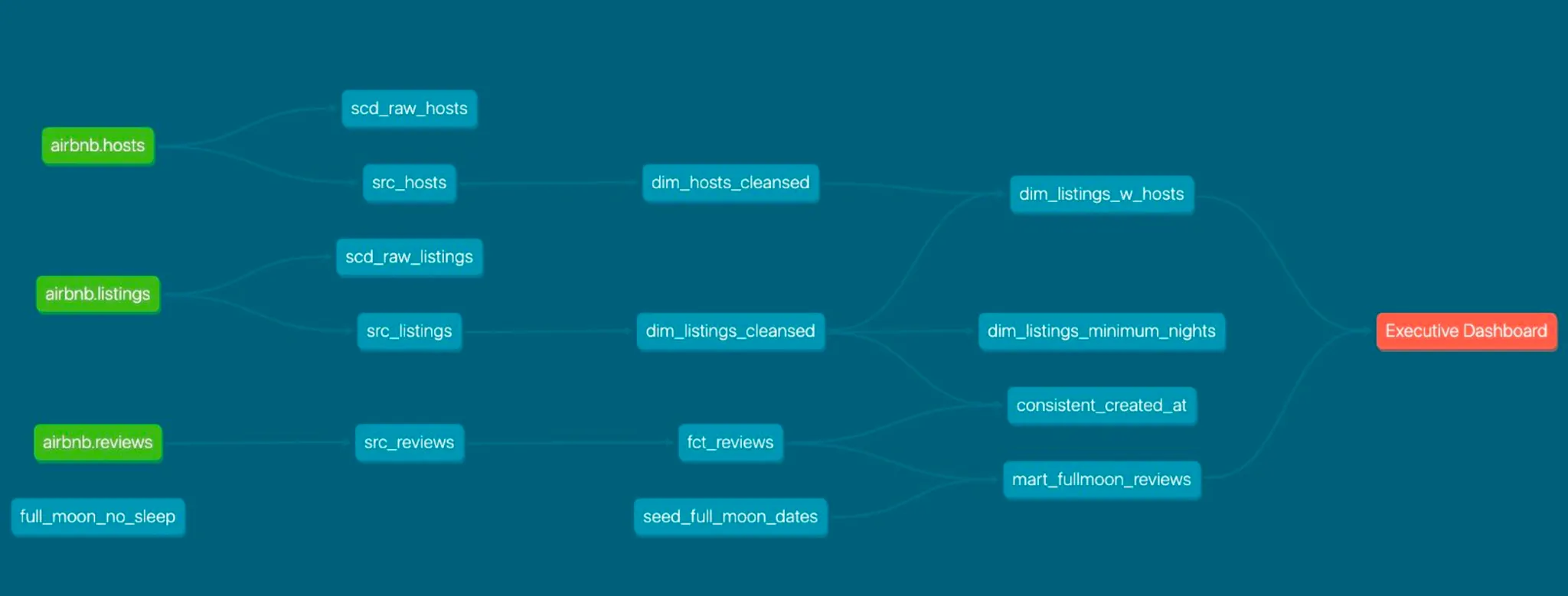
3 input tables: airbnb hosts airbnb listings airbnb reviews
-> make modifications in first layer = src layer
-> clean and make dim fact tables
-> + use external tables - and make mart table -(making test)-> make dashboard
git clone and running again
git clone and make
~/.dbt/profiles.yamlseed None issue
curl https://dbtlearn.s3.us-east-2.amazonaws.com/seed_full_moon_dates.csv -o seeds/seed_full_moon_dates.csv- then run dbt seed (seed data csv get imports to snowflake)
dbt run
(dbt-bootcamp) bagseeun-ui-MacBookAir-2:learn_dbt lenovo$ dbt seed 11:40:17 Running with dbt=1.11.2 11:40:18 Registered adapter: snowflake=1.11.1 11:40:18 Found 9 models 1 snapshot 17 data tests 1 seed 3 sources 1 exposure 903 macros 11:40:18 11:40:18 Concurrency: 1 threads (target='dev') 11:40:18 11:40:20 1 of 1 START seed file DEV.seed_full_moon_dates ................................ [RUN] 11:40:22 1 of 1 OK loaded seed file DEV.seed_full_moon_dates ............................ [INSERT 272 in 1.82s] 11:40:23 11:40:23 Finished running 1 seed in 0 hours 0 minutes and 4.37 seconds (4.37s). 11:40:23 11:40:23 Completed successfully 11:40:23 11:40:23 Done. PASS=1 WARN=0 ERROR=0 SKIP=0 NO-OP=0 TOTAL=1 (dbt-bootcamp) bagseeun-ui-MacBookAir-2:learn_dbt lenovo$ dbt run 11:42:08 Running with dbt=1.11.2 11:42:09 Registered adapter: snowflake=1.11.1 11:42:09 Found 9 models 1 snapshot 17 data tests 1 seed 3 sources 1 exposure 903 macros 11:42:09 11:42:09 Concurrency: 1 threads (target='dev') 11:42:09 11:42:12 1 of 6 START sql view model DEV.dim_hosts_cleansed ............................. [RUN] 11:42:12 1 of 6 OK created sql view model DEV.dim_hosts_cleansed ........................ [SUCCESS 1 in 0.81s] 11:42:12 2 of 6 START sql view model DEV.dim_listings_cleansed .......................... [RUN] 11:42:13 2 of 6 OK created sql view model DEV.dim_listings_cleansed ..................... [SUCCESS 1 in 0.79s] 11:42:13 3 of 6 START sql incremental model DEV.fct_reviews ............................. [RUN] 11:42:13 LoadingAIRBNB.DEV.fct_reviews incrementally (all missing dates) 11:42:17 3 of 6 OK created sql incremental model DEV.fct_reviews ........................ [SUCCESS 0 in 3.51s] 11:42:17 4 of 6 START sql table model DEV.dim_listings_w_hosts .......................... [RUN] 11:42:18 4 of 6 OK created sql table model DEV.dim_listings_w_hosts ..................... [SUCCESS 1 in 1.47s] 11:42:18 5 of 6 START sql table model DEV.no_nulls_in_dim_listings ...................... [RUN] 11:42:20 5 of 6 OK created sql table model DEV.no_nulls_in_dim_listings ................. [SUCCESS 1 in 2.15s] 11:42:20 6 of 6 START sql table model DEV.mart_fullmoon_reviews ......................... [RUN] 11:42:23 6 of 6 OK created sql table model DEV.mart_fullmoon_reviews .................... [SUCCESS 1 in 2.50s] 11:42:23 11:42:23 Finished running 1 incremental model 3 table models 2 view models in 0 hours 0 minutes and 13.84 seconds (13.84s). 11:42:23 11:42:23 Completed successfully 11:42:23 11:42:23 Done. PASS=6 WARN=0 ERROR=0 SKIP=0 NO-OP=0 TOTAL=6 (dbt-bootcamp) bagseeun-ui-MacBookAir-2:learn_dbt lenovo$- if I wanna run just one modified model: Run only the modified model: dbt run –select my_model_name
How the command works in real production
- local development
dbt run --select my_modelto iterate quickly on SQL logic without affecting prod data - pull request & CI
dbt buld --select state:modified+when I open a pr automated CI job triggers -> It uses dbt build to execute only the models you changed and their downstream dependencies in a temporary “staging” shcema. - prod deployment
dbt buildonce code is merged into the main branch the company’s orchestrator (like Airflow dbt Cloud) excutesdbt build against the prod target